
An AI assistant that can inspect infrastructure is useful during an incident. The same access becomes uncomfortable when nobody can answer four questions: what can it read, what can it change, who approves the change, and where can we see what happened?
GateRook makes those decisions explicit. It is a local desktop MCP gateway that connects AI apps to databases and infrastructure through selected connections, tool permissions, approval rules and Activity history. Service credentials are supplied by the connector, rather than copied into the assistant's tool arguments.
Control does not mean that data can never leave your computer. An allowed query result is returned to the AI app and may be sent to its model provider. The goal is to decide which results may leave, constrain operations before execution, and retain a useful record of those decisions.
Broad coverage, with a measurable definition
GateRook's catalog contains 122 integration entries as of November 15, 2026, including compatible-service presets and optional connector modules. These span SQL, documents, caches, analytics, search, vectors, metrics, logs, cloud infrastructure, object storage, HTTP APIs and external MCP servers. They are not 122 separate built-in connector implementations.
The database technologies represented in the current catalog account for about 98% of database selections in the Stack Overflow Developer Survey 2026. This is our mapping of catalog coverage to the survey, not a finding published by Stack Overflow about GateRook.
The calculation uses 12,061 respondents and 41,412 selections. Excluding Other (575), IBM Db2 (269) and Datomic (64) leaves 40,504, or 97.8%. It includes compatible services and downloadable modules; PocketBase counts only as access to its SQLite file, not its application API. The earlier 98.5% projection also included Db2, which is not in the current catalog.
This measures selections, not people, projects, complete technology stacks or feature completeness. One respondent can select several databases; a technology match does not verify every version, authentication mode or operation. Source: Stack Exchange Inc., “Databases,” Stack Overflow Developer Survey 2026, ODbL 1.0 (opens in a new tab). The survey methodology (opens in a new tab) describes the sample.
For a project manager, the catalog is a starting point for evaluating the team's actual stack. For a developer, the decisive check is whether the connector supports the operations and authentication your workflow needs.
Control 1: decide what the assistant can reach
GateRook separates a connection from an endpoint. A connection holds the configuration for a service. An endpoint exposes a selected set of connections and tools to an AI app.
For example, an incident endpoint might allow order queries, product-cache reads, selected pod logs and metrics. It does not need customer exports, unrelated databases, arbitrary HTTP destinations or every write tool offered by those services.
Use the narrowest service credentials that support the task. A MySQL account limited to a table, a Redis ACL, Kubernetes namespace permissions and a bucket-scoped token enforce restrictions at the service as well as in GateRook. GateRook cannot make a broad administrator credential equivalent to a narrowly scoped service account merely by giving the endpoint a reassuring name.
Keep development, staging and production separate. Production connections require production endpoints. The built-in tunnel does not publish production endpoints. Configure limits for query duration, request rate and returned data, and use connector-specific restrictions such as database selection, collection allowlists or Redis key patterns. The security model (opens in a new tab) describes the boundaries.
Control 2: choose what can execute automatically
An endpoint gives each tool on each connection a mode:
| Mode | Effect | A useful starting point |
|---|---|---|
| Off | The operation cannot execute through that endpoint. | Tools the task does not need. |
| Read only | Calls must pass the connector's read validation and applicable policies. | Bounded diagnostic reads. |
| Approval | The requested action waits for a review decision. | Specific changes, or sensitive reads that also need review. |
| Bypass | Calls run without human approval; policy denials and other limits still apply. | A deliberate exception, not the starting point for sensitive access. |
Read only does not mean harmless: a read can disclose confidential data or consume significant resources. Likewise, a database read-only transaction, a cloud IAM role and an API token offer different guarantees. Review the connector's documented behavior and retain service-level permissions.
Do not rely on an instruction such as “ask before changing anything” in the assistant's prompt as the only control. Configure the mode in GateRook so the execution path itself requires review. If Bypass is enabled, that human review is no longer required for those calls.
Control 3: approve the exact action, not a vague intention
We used the same isolated commerce demo as the six-service walkthrough. GateRook 2.0.0 connects to five real local services with fictional data; a local Kubernetes API fixture represents the GKE part. Requests come from Playground, not a recorded autonomous AI session.
The investigation found a stale cache: Redis held inventory version 17 with zero available units, while MongoDB and OpenSearch held version 18 with 12 units. The proposed correction was one Redis write.
{
  "connection": "cache-redis",
  "key": "product:sku-42",
  "value": "{\"sku\":\"sku-42\",\"available\":12,\"inventory_version\":18}",
  "condition": "XX",
  "ttlMs": 300000
}
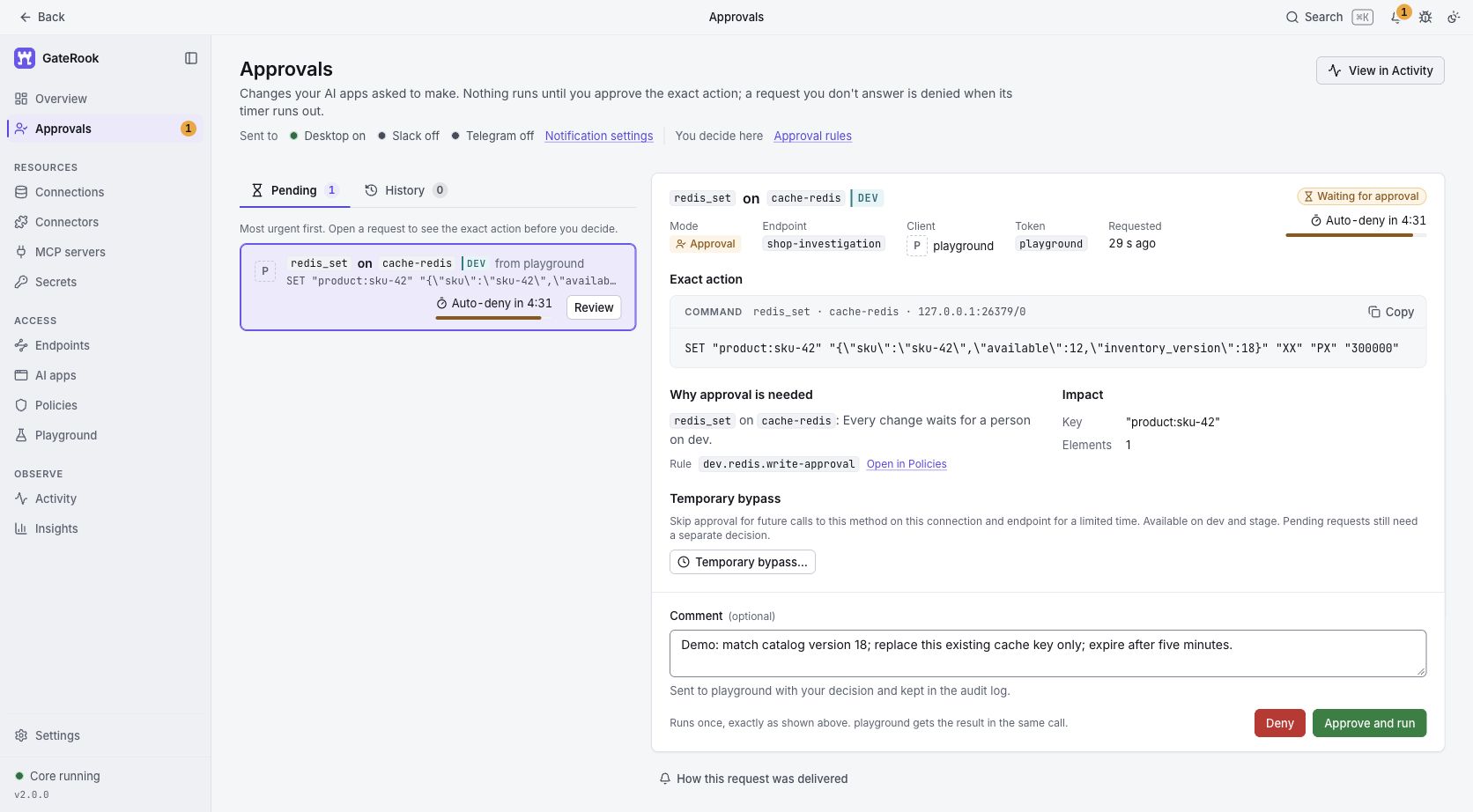
GateRook prepared the actual command and stopped before executing it:
An actual pending write to the local demo Redis service, captured before approval. The card shows the requesting endpoint and client, exact command, affected key, policy rule and expiry timer.
The reviewer can check the target, replacement value and expiry before selecting Approve and run or Deny. Here, XX means “only if the key exists”; it is not a compare-and-swap check. A five-minute TTL limits the lifetime of the replacement but does not prove the business value is correct. Those details matter more than an assistant saying that a fix is safe.
Approval is bound to the prepared action, and policy and integrity checks run again before execution. An unanswered request expires; it is not approved automatically. Once an operation has executed, an approval system cannot undo it by changing the decision afterward.
In the demo, we approved the command with a comment explaining the intended version and expiry. The write succeeded, and a separate read verified the new value and remaining TTL. For a real incident, the reviewer should also check ownership of the cache and whether the application's normal refresh mechanism is the appropriate repair.
Control 4: retain evidence in Activity
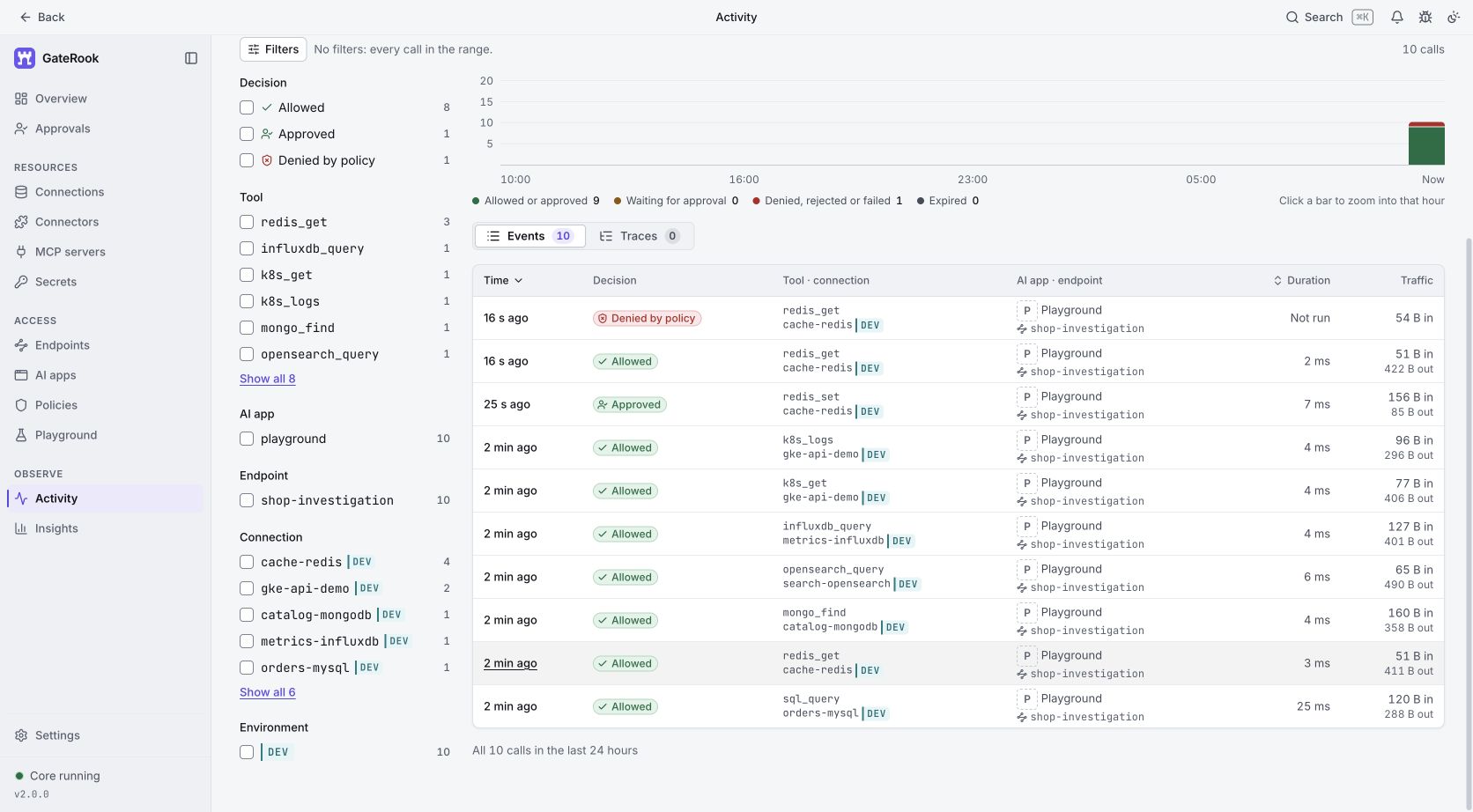
Actual demo calls in Activity. The list distinguishes allowed reads, the approved write and a policy denial. Kubernetes calls reached a local test fixture, not a live GKE cluster.
Activity answers operational questions that an assistant's final message cannot answer on its own: which endpoint and caller made the request, which connection received it, what decision applied, how long execution took, and what result was recorded.
Opening the approved Redis call shows a more detailed chain:
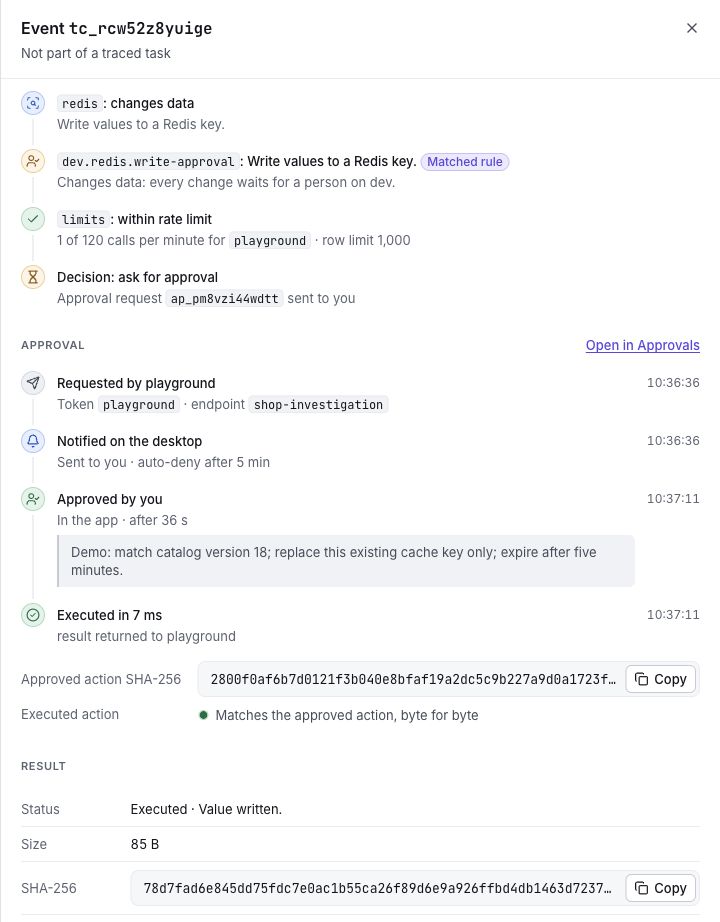
The request, review comment, execution event and successful result in one record. GateRook reports that the executed action matches the approved action byte for byte.
The demonstration also requested redis_get for session:demo-user. The connection permitted product:* and denied session:*. GateRook rejected that call with dev.redis.key-not-allowed; Activity marks it Denied by policy and Not run. The restriction applies even though the request is a read.
GateRook's audit is append-only and tamper-evident, with hash chains and authenticated heads. This helps detect changes to history; it is not an absolute guarantee against a privileged local administrator. Retention and export settings also matter. Keep only the history you need, protect the workstation and exported records, and review them as operational evidence rather than an automatic compliance certificate.
Credentials and returned data need different controls
The local vault encrypts stored secrets with AES-256-GCM. When enabled and available, operating-system credential protection protects the master-key file. The app exposes the active protection state. External secret stores can supply credentials at call time. These controls keep service passwords out of ordinary AI client configuration and tool arguments.
That encryption does not encrypt every activity record or make an unencrypted network connection safe. Use verified TLS or SSH host-key checks for remote services. Our loopback demonstration uses simplified development authentication; it is not a deployment template.
Returned business data needs its own boundaries. Prefer database views and narrowly selected fields, configure supported masking rules, and test the result the assistant actually receives. Recognition and masking reduce exposure; they cannot reliably detect every possible secret, transformation or sensitive fact.
An approved query can still return an email address, an internal incident description or commercially sensitive numbers if your scope permits them. Decide whether the chosen AI app and model provider may process that information before granting access. GateRook governs requests that pass through it; separate credentials or alternate access paths remain outside those controls.
A practical rollout for developers and IT managers
Start with a single non-production investigation and define its allowed resources and operations. Have a developer configure scoped service accounts and the endpoint. Have the person responsible for the service review the proposed write modes and the data that can be returned.
Before connecting an assistant, use Playground to verify three outcomes: an expected read succeeds, an out-of-scope request is denied, and a permitted change waits for approval. Inspect each result in Activity. Our demonstration exercised all three.
Agree who reviews requests, what evidence they need, and how long history should be retained. Then expand access only as the workflow requires. A manager can evaluate adoption using the team's own incident and review data without assuming that broad connector coverage automatically produces faster or safer work.
The getting-started guide walks through the first connection. The useful destination is concrete: your assistant can gather relevant evidence, the team can decide which changes run, and both can trace the result afterward.