
Your AI assistant can explain a slow checkout only if it can see the systems behind it. The order is in MySQL, stock is in MongoDB, the cache is in Redis, the application runs on Google Kubernetes Engine, search lives in OpenSearch, and performance metrics are in InfluxDB. Giving the assistant six separate integrations is possible. Keeping their credentials, permissions and change histories understandable is the harder part.
GateRook brings those connections behind a local MCP gateway. You configure services in the desktop app, choose which tools an endpoint exposes, and connect your AI app to that endpoint. GateRook supplies the service credentials, applies access rules, asks for approval where configured, and records the calls in Activity.
What “replace 100+ MCP servers” actually means
A separate MCP server is one way to give an AI app tools for a service. GateRook already implements connectors for many of those services, so you can use their tools without finding, configuring and operating an additional MCP server package for each technology.
The GateRook integration catalog has 122 entries as of November 15, 2026: 50 specific connector types, 71 compatible-service entries, and the generic external MCP server integration. A compatible-service entry configures an existing connector for a related product; it is not an independent implementation. For example, several PostgreSQL services share the PostgreSQL connector.
Most connectors are included with GateRook. Cassandra, Neo4j, ClickHouse, DuckDB, H2 and Microsoft Access are delivered as optional connector modules and require the optional Java runtime. Their initial download requires internet access. See connector delivery (opens in a new tab).
That is the practical meaning of the headline: one managed access point can replace separate MCP server setups across more than 100 supported integrations. It is not a claim that every team runs 100 servers, or that GateRook reproduces every feature of every specialist MCP implementation. Check the operations, authentication and limits of the connector you need. Existing MCP servers can also be connected through GateRook when they provide tools you want to retain.
The connectors, grouped by the work they do
| Group | Examples | What an investigation can ask for |
|---|---|---|
| Relational databases | PostgreSQL, MySQL, MariaDB, SQL Server, Oracle, SQLite, Spanner | Discover schemas, inspect tables and run bounded queries. |
| Documents, caches and distributed data | MongoDB, Redis, DynamoDB, Firestore, Firebase Realtime Database, Cosmos DB, Cassandra | Find documents, inspect keys and compare application state. |
| Analytics and graph data | BigQuery, Snowflake, Redshift, Databricks SQL, Trino, Athena, ClickHouse, Neo4j | Query analytical data or inspect relationships. |
| Search and vector stores | OpenSearch, Elasticsearch, Algolia, Meilisearch, Typesense, Azure AI Search, Pinecone, Qdrant, Milvus, Weaviate, Chroma | Inspect search results, documents and supported vector searches. |
| Metrics and logs | InfluxDB, Prometheus, Cloud Logging, CloudWatch Logs, Azure Monitor Logs, Loki, SSH log files | Compare telemetry with application events. |
| Cloud and infrastructure | Kubernetes, AWS, GCP, Azure, Cloudflare, SSH | Inspect resources, read pod logs and review supported changes. |
| Storage, APIs and extensions | S3-compatible storage, HTTP/OpenAPI, external MCP servers | Read selected objects, expose API operations and retain specialist tools. |
These groups describe the catalog, not identical capabilities across products. A read-only boundary can depend on database transactions, a scoped token, a cloud role or connector validation. The service's own permissions still apply.
A realistic stack: investigate inconsistent stock at checkout
Imagine a small commerce team. A product appears in search, but checkout says it is unavailable. The team needs to compare several views of the same SKU before deciding whether to change anything.
| Connection | Role in the application | Question to answer |
|---|---|---|
orders-mysql | Orders and checkout state | What happened to order 1001? |
cache-redis | Cached product availability | Is the cache using an old inventory version? |
catalog-mongodb | Product documents | What stock and version does the catalog contain? |
gke-api-demo | Kubernetes workloads, representing the GKE deployment | Are the checkout pods running, and what do their logs report? |
search-opensearch | Searchable product documents | Does the indexed product match the catalog? |
metrics-influxdb | Checkout telemetry | What latency and error measurements accompany the report? |
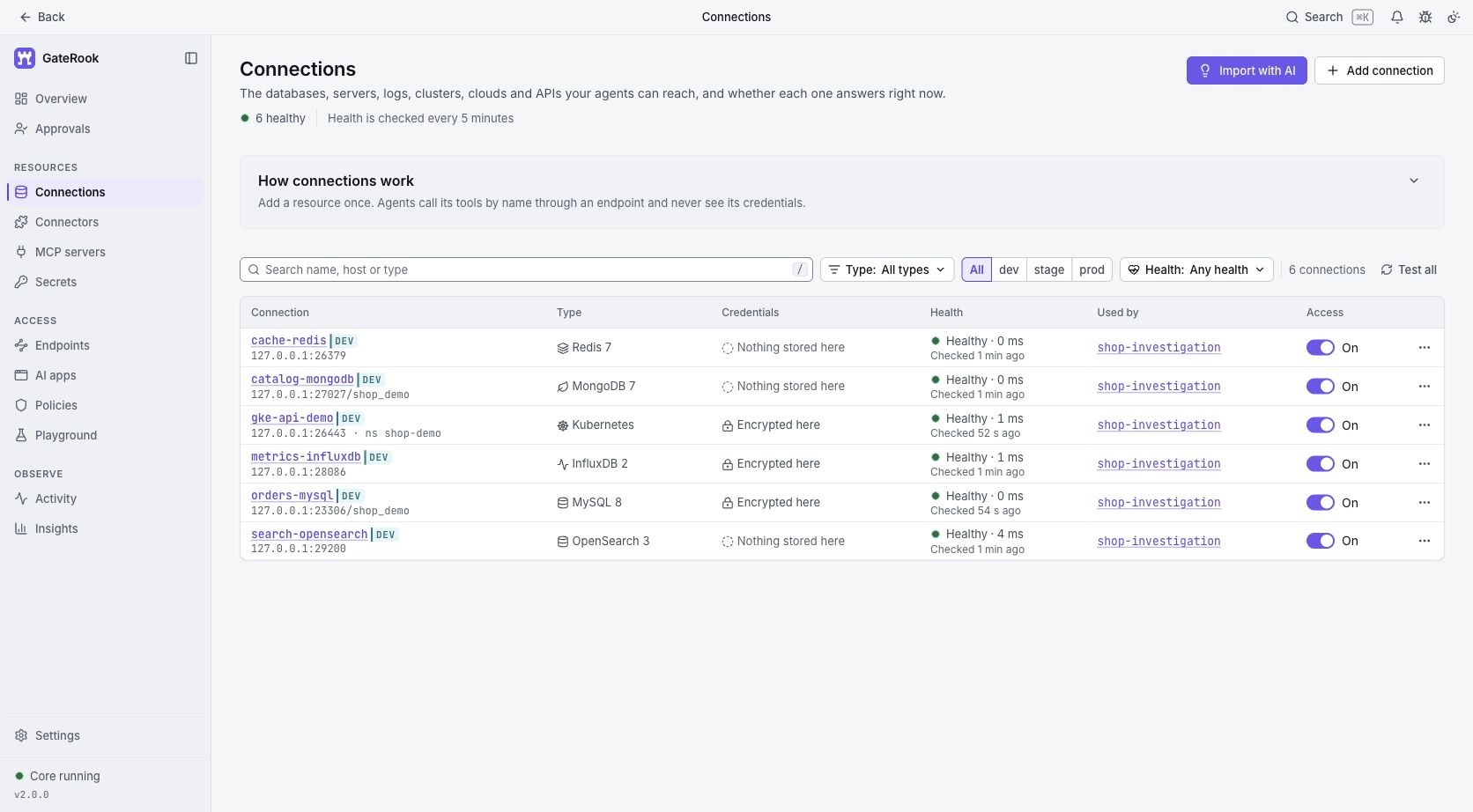
For this walkthrough we ran GateRook 2.0.0 in an isolated profile with fictional shop data. MySQL, Redis, MongoDB, OpenSearch and InfluxDB are real local services. The GKE example uses a local Kubernetes API test fixture, not a Google Cloud cluster. Calls were made through GateRook's Playground, which exercises its MCP execution and approval pipeline; the screenshots are not an AI conversation or a production incident.
Six saved connections on the shop-investigation endpoint. The Kubernetes health check refers to the local test fixture. Loopback addresses and simplified development authentication are demonstration settings, not production configuration advice.
1. Configure connections and one endpoint
Open Connections → Add connection, choose the service, and enter its address and credentials. Use names that communicate purpose. Test each connection, then add it to an endpoint such as shop-investigation.
On the endpoint's Tools & policies tab, keep investigation tools in Read only, leave the specific changes you intend to review in Approval, and set unrelated operations to Off. Our endpoint has 17 read-only tools, two approval tools and 11 disabled tools, including the gateway's own discovery tools. No tool uses Bypass.
For a real GKE cluster, use the Kubernetes connector with the intended namespace and cluster access. GKE authentication may use a kubeconfig credential command, which you must explicitly review and allow. Network reachability and Kubernetes permissions remain prerequisites; a GCP account alone does not grant access to a private cluster. Google's cluster access guide (opens in a new tab) explains the GKE authentication setup.
Then open AI apps, choose your assistant and connect it to this endpoint. The AI app guides cover Claude Desktop, Codex, Cursor, Antigravity and VS Code. The assistant receives endpoint access rather than copies of the database passwords.
2. Ask for evidence across the stack
A useful investigation prompt is specific about both the question and its limits:
Investigate why order 1001 cannot purchase SKU sku-42. Compare the order, cached availability, product document, search document, checkout pod logs and recent metrics. Use only the shop-investigation endpoint. Return the evidence and a proposed fix; do not make changes yet.
The following are the tool calls we actually exercised in Playground, and the results from the fictional dataset:
| Tool | Evidence returned |
|---|---|
sql_query on MySQL | Order 1001 is pending; its inventory version is 18 and total is 129.90. |
redis_get on Redis | product:sku-42 says zero available units and inventory version 17. |
mongo_find on MongoDB | The product has 12 available units and inventory version 18. |
opensearch_query on OpenSearch | The indexed product also has 12 units and version 18. |
influxdb_query on InfluxDB | A seeded checkout measurement contains p95_ms=840 and error_rate=0.08. |
k8s_get and k8s_logs on the fixture | A running demo pod and a sample log line showing cache version 17 versus expected version 18. |
The version mismatch makes stale cache data a plausible explanation. It does not establish that the cache caused every latency or checkout error. A real investigation should check the update path, timestamps and subsequent behavior before treating that hypothesis as a root cause.
Here is the bounded MySQL read used in the demo:
SELECT id, status, inventory_version, total
FROM orders
WHERE id = 1001;
The connection supplies the credentials. The tool arguments describe the query and its target, not a database login.
3. Review a proposed change before it runs
The demonstration proposes replacing one existing Redis value with version 18 and a five-minute expiry. GateRook prepares the exact SET command and holds it for approval.
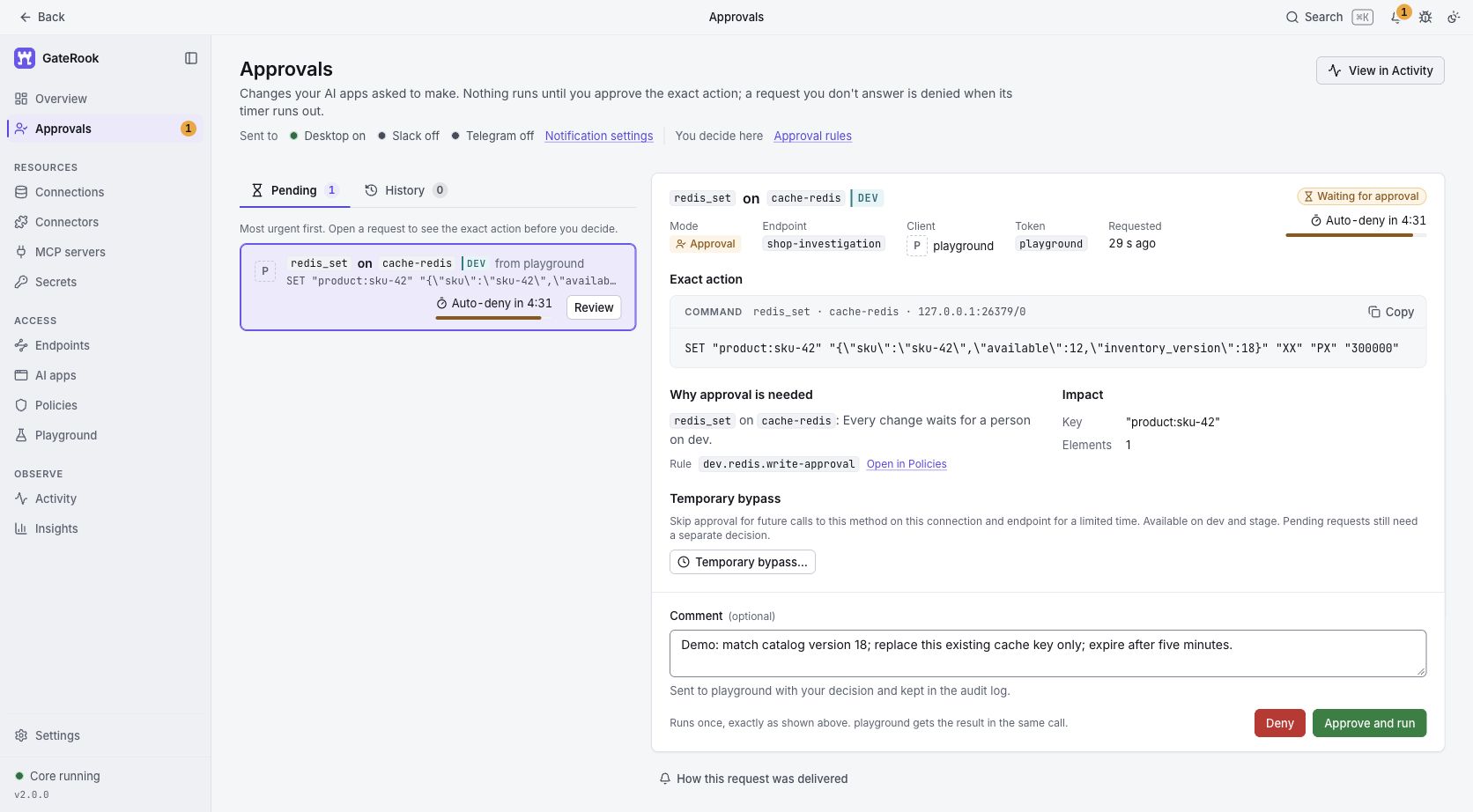
The real approval request for the local Redis service. The card identifies the endpoint, caller, key, value, condition and expiry, and offers Deny or Approve and run.
The XX condition requires that the key already exist; it does not compare the previous value or prevent every race. The expiry is explicit so the replacement cannot accidentally become permanent. In a real application, prefer its supported cache refresh mechanism when it performs additional consistency checks.
After approving the request, GateRook executed the write. A follow-up redis_get returned 12 available units, inventory version 18 and a remaining expiry. The demo did not change the order or the source product document.
4. Read the investigation in one Activity log
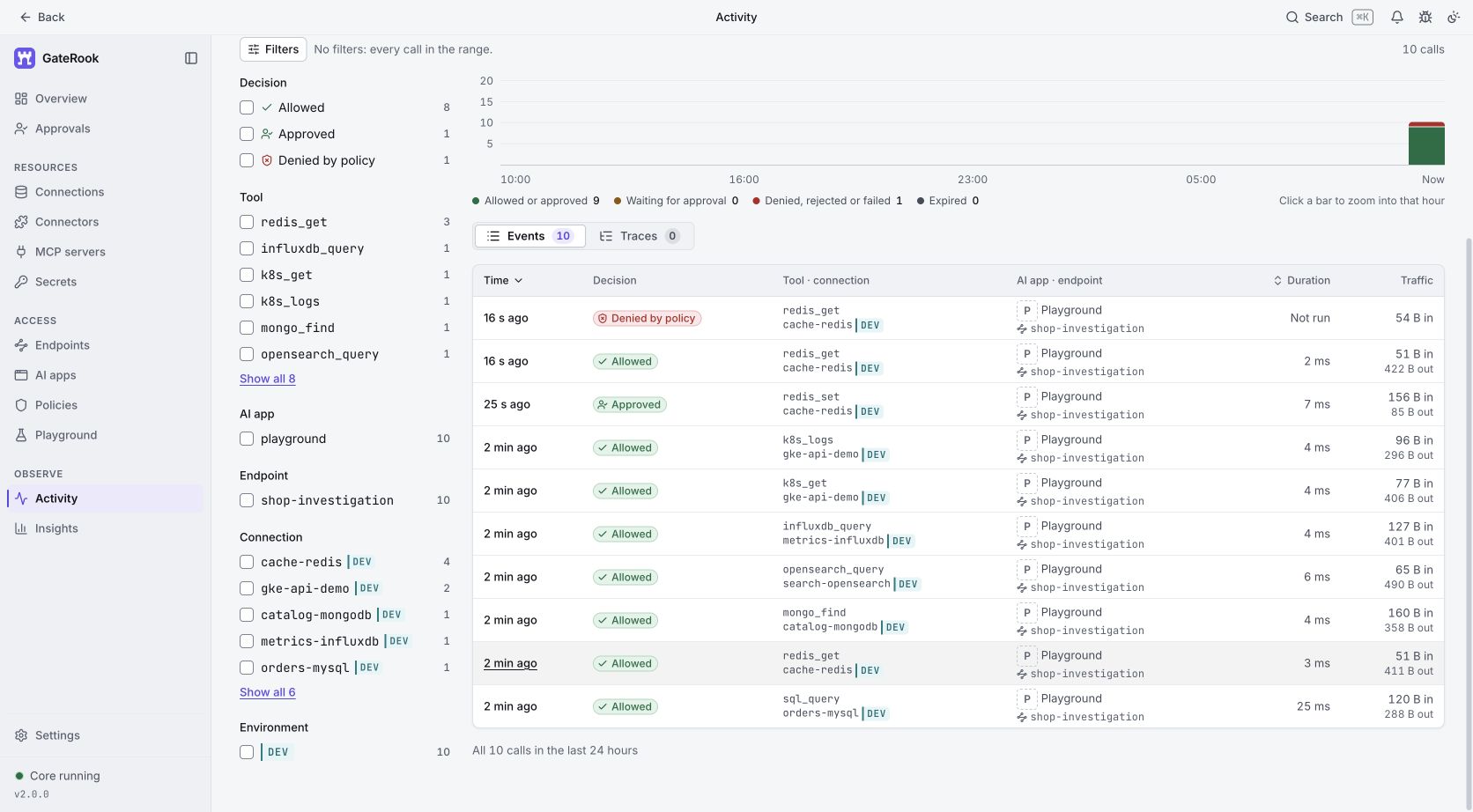
Ten actual calls: eight allowed reads, one approved Redis write, and one read denied by the key policy. The Kubernetes calls use the explicitly labeled local fixture.
Activity puts the connection, tool, caller, decision, duration and traffic together. Opening the approved write shows the review comment, execution outcome and confirmation that the executed action matches the approved action. We also attempted a read of session:demo-user; the connection's session:* restriction denied it without running the Redis operation.
For a developer, this makes it easier to move from an assistant's explanation back to the calls behind it. For an IT project manager, it provides a concrete review trail: which access was granted, which change was approved and whether it ran. These records are evidence of the tool workflow, not proof that an AI diagnosis is correct.
Where the simplification pays off
With separate integrations, each new service can bring another configuration, credential location and operational convention. GateRook gives the team one place to name connections, define endpoint access, review supported changes and inspect history. Separate endpoints can serve development, staging and production without exposing the whole catalog to every assistant.
You still need appropriate service accounts, network access and verified transport. Allowed results reach the AI client and may reach its model provider. The companion article, Give AI infrastructure access without losing control of your data, explains those boundaries and the controls to configure.
Start with one non-production workflow using the getting-started guide. Add the few connections it needs, verify a read and an approval in Playground, then connect your AI app. The useful outcome is an investigation you can understand and control, regardless of how many technologies the catalog supports.