
I want Claude to help me work faster without giving one mistaken tool call the power to change production. The uncomfortable case is not necessarily a spectacularly bad command. Sometimes the SQL is valid, the condition looks reasonable, and the mistake is a single connection name.
Consider a cleanup intended for a development database. If the same request reaches production, an ordinary maintenance task becomes a data-loss risk. Here is how I would put a boundary around that mistake with GateRook, and what I look for in the record of a blocked action.
The SQL is valid. The destination is wrong.
Imagine this request to Claude:
Delete the cancelled test orders from the development database. Leave production untouched.
The intended connection is shop-dev. The dangerous call would instead use shop-prod:
{
  "connection": "shop-prod",
  "sql": "DELETE FROM orders WHERE status = 'cancelled';"
}
There is a WHERE clause. There is no syntax error. Neither fact makes the action correct. Cancelled production orders can still matter for refunds, customer support, reporting, and reconciliation. Their status does not mean they are disposable test data.
The error in this scenario is selecting production for a development task. Reviewing the SQL alone would miss it. I need the connection, environment, table, and requested operation to be checked together.
Make the restriction explicit
For the concrete example below, I use GateRook 2.0.0 with two separate local SQLite databases containing fictional orders. One connection is labelled DEV and the other PROD. I submit the example request through GateRook's Playground, so the screenshots correctly identify Playground as the caller. They show an actual gateway decision, not a record of an autonomous Claude incident or a live customer database.
The production endpoint has the following configuration:
| Tool | Mode | Scope in this example |
|---|---|---|
sql_query | Read only | Can read the orders needed for investigation. |
sql_execute | Approval | Its table allowlist contains only main.maintenance_jobs. |
The write tool's scope excludes main.orders. Reading an order and deleting it therefore have different permissions.
This distinction is essential: a PROD label alone does not block every DELETE. The protection here comes from the configured table restriction. Approval is a separate gate for changes that are within the permitted scope; it does not turn an out-of-scope request into an allowed one.
If an assistant only needs to investigate production, I would start with a read-only endpoint and leave unnecessary mutation tools Off. This example keeps a narrowly scoped write tool available to show what happens when the requested table falls outside that scope.
The request stops inside GateRook
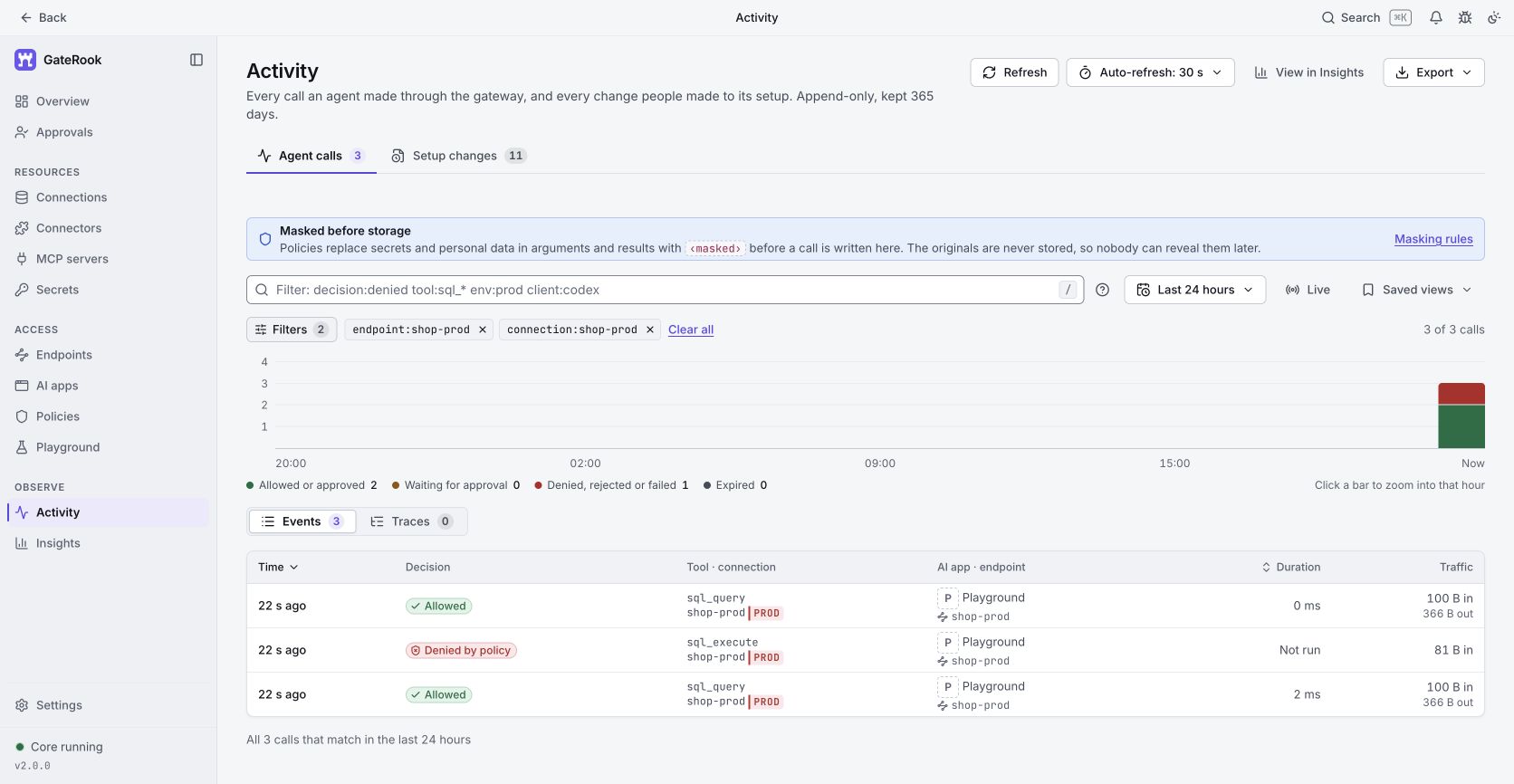
I first read the four orders, submit the DELETE once, and then read the same orders again. Activity records all three calls:
Activity is sorted newest first: the verification read is at the top, the blocked DELETE is in the middle, and the initial read is at the bottom.
The middle row says Denied by policy and Not run. Opening it shows the exact destination and SQL:
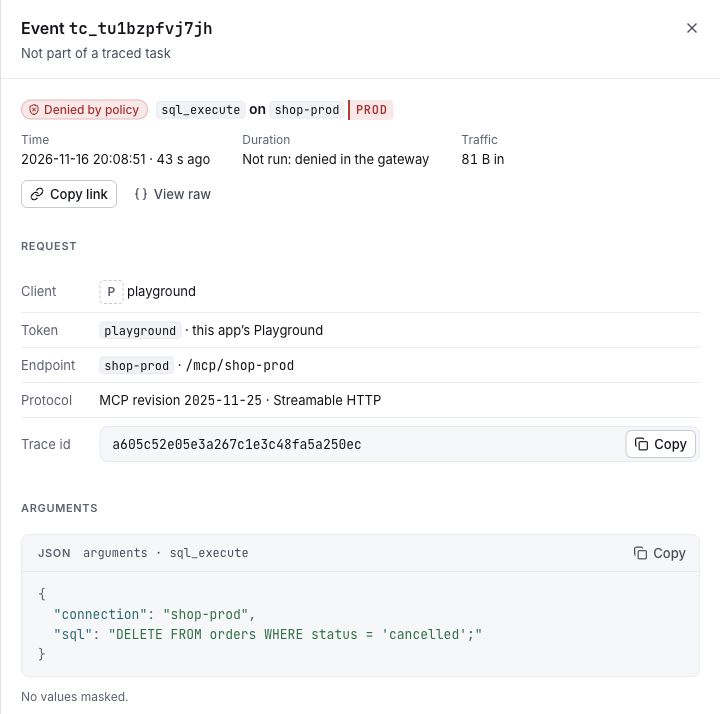
The request record preserves the caller, endpoint, trace identifier, and submitted arguments. The connection is shop-prod, even though the scenario's intended task concerns shop-dev.
The policy decision names the rule:
prod.sql.table-not-allowedIts recorded reason is:
main.orders isn't one of the tables agents may use on prod.In this configuration, that restriction applies to sql_execute; the separate read tool remains permitted. The decision panel also confirms that no approval request was created and nothing reached shop-prod for this DELETE.
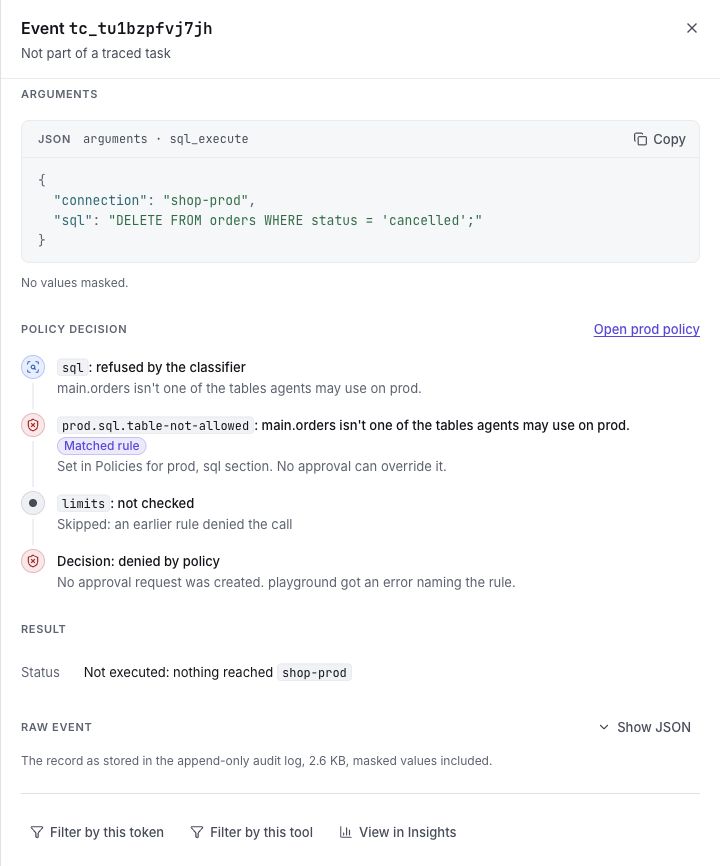
The SQL, matched rule, and execution outcome belong to the same event, tc_tu1bzpfvj7jh.
This is not an executed DELETE that happened to affect zero rows. It is a request refused before database execution. It is also different from a request waiting for someone to approve it.
Read the log, then verify the data
The stored audit event gives me a compact way to connect the screenshot to the underlying record. These are selected fields from that actual event:
{
  "callId": "tc_tu1bzpfvj7jh",
  "at": "2026-11-16T19:08:51.240Z",
  "phase": "received",
  "decision": "denied",
  "tool": "sql_execute",
  "connection": "shop-prod",
  "env": "prod",
  "client": "playground",
  "endpoint": "shop-prod",
  "durationMs": null,
  "rule": "prod.sql.table-not-allowed",
  "approvalId": null
}
The timestamp is UTC; the screenshot displays the same event at 20:08:51 in Europe/Madrid. There is no approval identifier or database execution duration. The detailed record classifies the request as a mutation and the policy outcome as DENY.
I also verify the data independently of the rejection message:
SELECT id, status, total_cents
FROM orders
ORDER BY id;
Both reads returned these same values:
| Order | Status | Total, cents |
|---|---|---|
| 1001 | paid | 12900 |
| 1002 | cancelled | 8900 |
| 1003 | shipped | 4500 |
| 1004 | cancelled | 7600 |
Both cancelled orders remain. A separate comparison also found the two local database files byte-for-byte unchanged. This establishes the outcome of this specific request and configuration; it is not a promise that every possible production mistake will be blocked.
My response to this kind of mistake
I would correct the target before considering any retry. For a development cleanup, I would read the matching records through shop-dev, check that they are disposable, and review the proposed deletion in that environment. A denial is not a reason to widen production permissions until the original request succeeds.
I would then check why a development task had production access at all. GateRook separates endpoints from connections, so I can give a development session only its development resources. Clear names help; restricting what the session can reach is stronger than relying on names or a reminder in the prompt.
For work that genuinely requires production changes, I keep the permitted resources narrow and review the exact target and operation through Approval. Bypass removes that human review step for otherwise permitted calls, so it deserves a deliberate decision. It does not remove policy denials or database permissions.
Keep the protection on the execution path
GateRook governs requests routed through it. A separate production password, direct database client, or unrestricted MCP server creates another path that needs its own controls. I still need appropriate database privileges, backups, and recovery procedures. Claude's own permission controls remain useful alongside the gateway.
What I want from GateRook is concrete: a mistaken destination should meet an enforced restriction before data changes, and I should be able to inspect the request and decision afterward. In this example, the DELETE stopped at the gateway and the orders stayed intact.
Start with the getting-started guide, connect Claude Desktop, and check the SQLite guide or your database's connector documentation. The GateRook security model (opens in a new tab) explains the boundaries of scope, approval, and audit.